Employees Overview
Overview
The Employees section allows you to manage all employee records, track personal and employment details, monitor salary information, and review wage and payout history.
Employee List Page
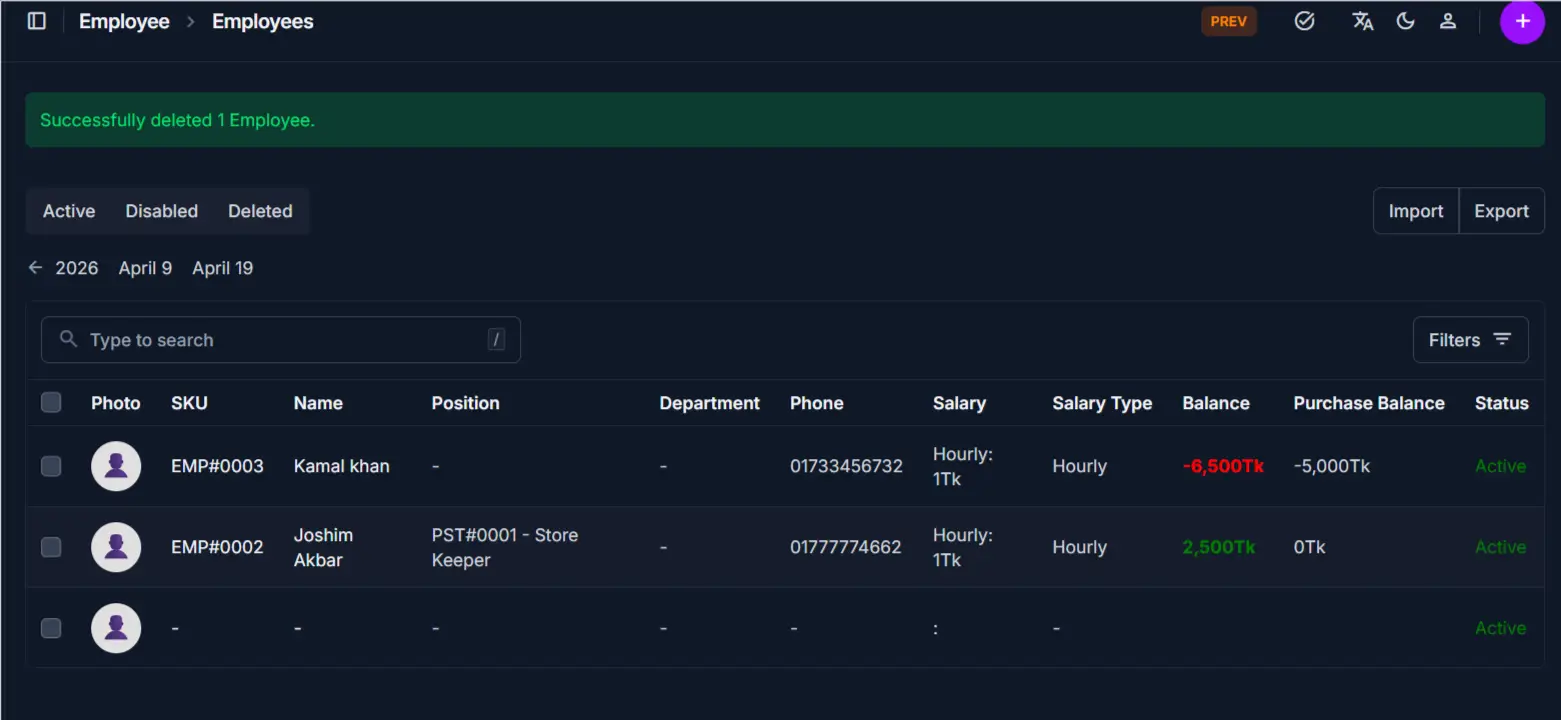
The Employee List page displays all employees in a table format for quick access and management.
Key Features
- View all employees with essential personal and employment details
- Filter employees by Active, Disabled, or Deleted status
- Search and locate specific employees quickly
- Import or export employee records in bulk
- Access individual employee detail pages directly
Table Information
The table provides a real-time summary of your workforce:
| Column | Description |
|---|---|
| Photo | Employee profile photo thumbnail |
| SKU | Unique identifier (e.g., EMP#0002); clickable link to the employee detail page |
| Name | Full name of the employee; clickable link to the employee detail page |
| Position | The job position assigned to the employee (e.g., PST#0001 - Store Keeper) |
| Department | The department the employee belongs to |
| Phone | Primary contact number of the employee |
| Salary | The employee's salary rate and type (e.g., Hourly: 1Tk) |
| Salary Type | Compensation structure (e.g., Hourly, Monthly) |
| Balance | Current salary balance; negative values are highlighted in red |
| Purchase Balance | Outstanding purchase balance linked to the employee |
| Status | Current state of the employee record (Active, Disabled, Deleted) |
Status Tabs
At the top of the list, three tabs let you filter employees by their current state:
| Tab | Description |
|---|---|
| Active | Employees currently working and active in the system |
| Disabled | Employees who have been deactivated but not deleted |
| Deleted | Employees whose records have been soft-deleted |
Search
Use the search bar to find employees by name or SKU. The list filters in real time as you type.
Import and Export
- Click Import to bulk-upload employee records from a file
- Click Export to download the current employee list for reporting or backup
Filtering the List
Click the Filters button in the top-right corner to narrow results by specific criteria such as department, position, salary type, or date range.
Employee Detail Page Tabs
The Employee Detail page is divided into multiple tabs, each focusing on a different aspect of the employee record.
General Tab
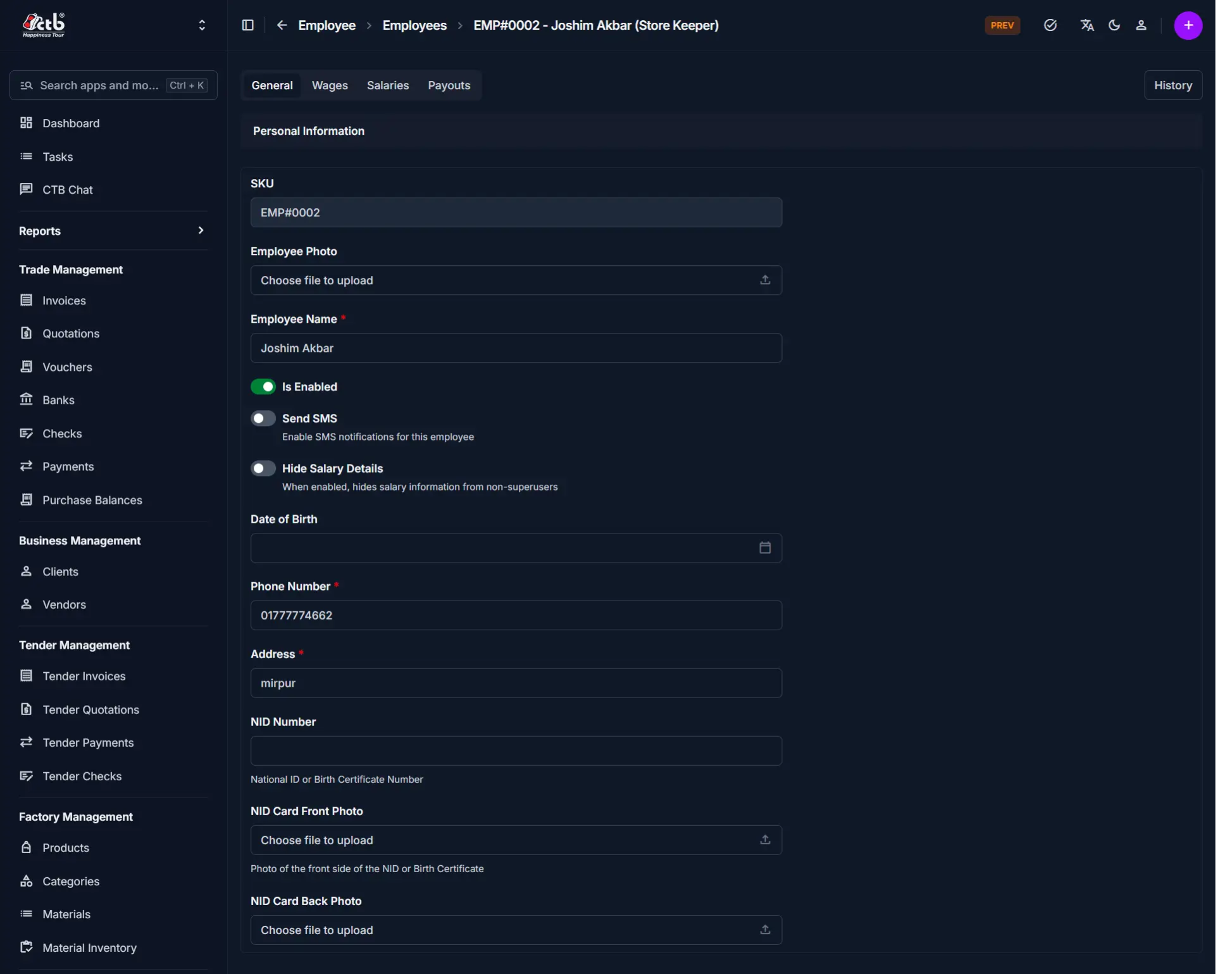
This tab contains the complete employee profile.
Personal Information
| Field | Description |
|---|---|
| SKU | Auto-generated unique identifier for the employee (read-only) |
| Employee Photo | Profile photo of the employee |
| Employee Name | Full name of the employee |
| Is Enabled | Toggle to activate or deactivate the employee in the system |
| Send SMS | Toggle to enable SMS notifications for this employee |
| Hide Salary Details | When enabled, hides salary information from non-superusers |
| Date of Birth | Employee's date of birth |
| Phone Number | Primary contact number |
| Address | Physical address of the employee |
| NID Number | National ID or Birth Certificate number for identity verification |
| NID Card Front Photo | Photo of the front side of the NID or Birth Certificate |
| NID Card Back Photo | Photo of the back side of the NID or Birth Certificate |
Emergency Contact
| Field | Description |
|---|---|
| Emergency Contact Name | Full name of the emergency contact |
| Emergency Phone Number | Contact number for emergencies |
| Emergency Address | Address of the emergency contact |
Employment Details
| Field | Description |
|---|---|
| Work Position | The position assigned to this employee |
| Work Department | The department this employee belongs to |
| Purchase Balance | Outstanding purchase balance linked to the employee |
| Start Date | The date the employee started in their current role |
| End Date | The date the employee's contract or role ends (if applicable) |
Salary Information
| Field | Description |
|---|---|
| Salary Type | Compensation structure (e.g., Hourly, Monthly) |
| Salary Rate | The rate of pay per unit of the selected salary type |
| Balance | Current salary balance (negative values indicate amounts owed) |
| Upper Balance Limit | Maximum salary balance threshold for monitoring |
| Lower Balance Limit | Minimum salary balance threshold for monitoring |
Wages Tab
This tab displays all wage entries linked to this employee.
Includes
- Production-based wage records
- Quantity produced per entry
- Net wage after deductions and bonuses
- Payment status for each wage entry
Purpose
Used to review the employee's production output and associated wage calculations over time.
Salaries Tab
This tab displays all fixed salary records for this employee.
Includes
- Salary payment records
- Payment dates and amounts
- Salary type and period
Purpose
Used to track periodic fixed salary payments made to the employee.
Payouts Tab
This tab displays all payout transactions associated with this employee.
Includes
- Payout reference and amount
- Payment date and method
- Outstanding payout balances
Purpose
Used to monitor all disbursements made to the employee across wages, salaries, and other payments.
History Button
Click the History button in the top-right corner of the Employee Detail page to view a full audit trail of all changes made to the record.
Includes
- Chronological list of all actions (Created, Changed)
- Field-level change log with before and after values
- User identification for each change
Deleting an Employee
A Delete Employee button is available at the bottom-left of the Employee Detail page.
Restricted Action
Deleting an employee moves the record to the Deleted tab. Employees with linked wages, salaries, or payouts cannot be permanently removed while those records exist. Contact your system administrator for permanent deletion.
Tips and Common Issues
- Negative balance shown in red — The employee has an outstanding salary balance; review wage and payout records to reconcile
- Hide Salary Details — Enable this toggle to restrict salary visibility to superusers only
- Send SMS toggle — Ensure the phone number is correct before enabling SMS notifications
- Purchase Balance — Tracks any purchases made by the employee that are to be deducted from their compensation
- Use status tabs to filter — Switch between Active, Disabled, and Deleted tabs to locate employees at different stages
- Import/Export for bulk management — Use Import to onboard multiple employees at once and Export for payroll reporting
- NID photos recommended — Upload clear front and back photos of the NID card for identity verification and compliance
Related Pages
- Add Employee — Register a new employee in the system
- Positions — Manage job positions assigned to employees
- Departments — Manage departments employees belong to
- Wages — View and manage production-based wage records
- Salaries — View and manage fixed salary records
- Payouts — Track and process employee disbursements
- Attendance — Monitor employee attendance records