Payouts Overview
Overview
The Payouts page lets you review all employee payout records and monitor payment status. Use this section to track advances, salary adjustments, and other employee payments, and verify whether payouts are pending or already completed.
When to use Payouts Overview page
- Review recent payout transactions for all employees
- Check the status of a specific payout before or after issuing payment
- Verify payment date and amount for a completed payout
- Track pending payouts that still require approval or disbursement
How to access Payouts Overview page
- From the sidebar, go to Employee → Payouts.
- The list page shows payout records grouped by Active, Pending, Completed, and other statuses.
- Select a record to open the payout detail page and review full transaction information.
Page sections
Payout List
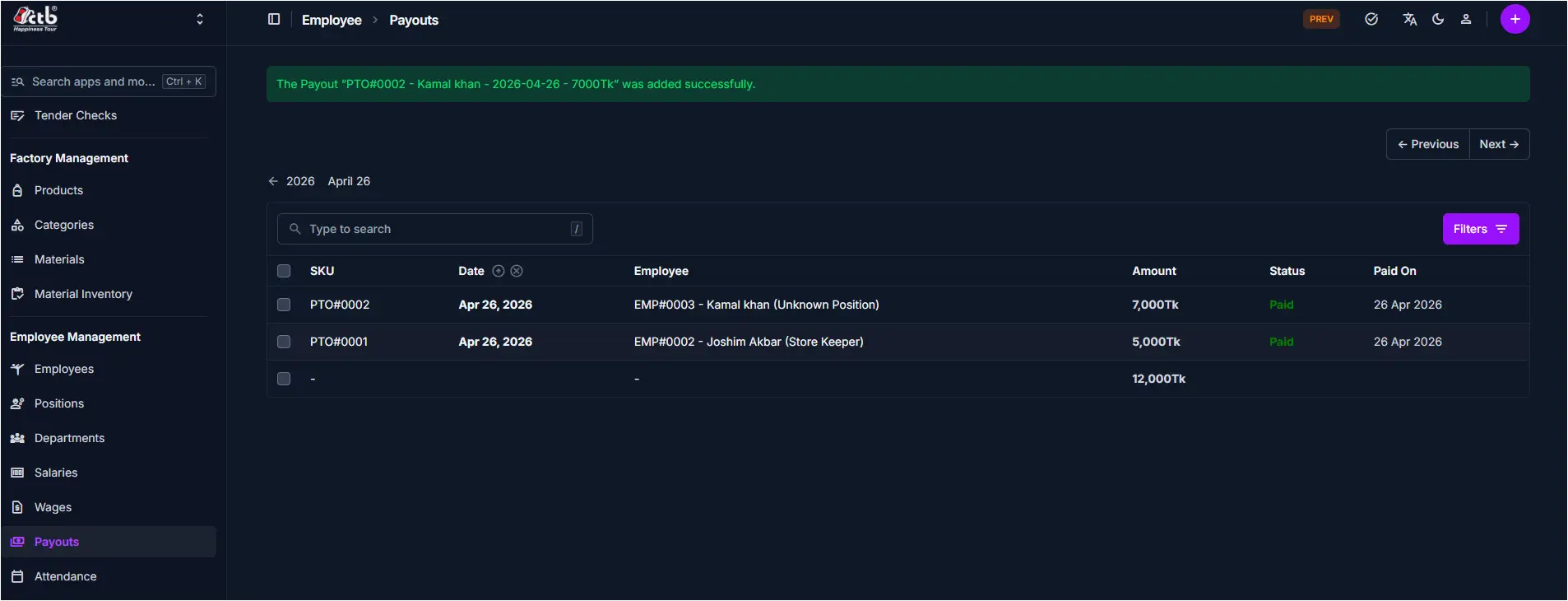
The main list shows each payout transaction on a single page.
Key columns include:
- SKU — Payout reference code with employee name and payout date (e.g.,
PTO#0002 - Kamal Khan - 2026-04-26) - Date — Date when the payout was recorded or processed
- Employee — Employee name and position receiving the payout
- Amount — Payout amount in local currency (e.g., 7,000Tk)
- Status — Current payout status such as
PaidorUnpaid - Paid On — Actual date payment was issued to the employee
Search and filters
- Use the search field to find specific payout records by SKU, employee name, or reference.
- Use status tabs to filter records by Pending, Approved, Paid, or other statuses.
- Use the Filters button to narrow results by date range, employee, or amount.
Best practices
- Verify the Employee and Amount before marking a payout as paid to avoid accounting errors.
- Confirm the Status before editing a completed payout, as some payouts may be restricted from modification.
- Use the Paid On date to match payouts against bank records and employee payment history.
- Review the full SKU reference to trace the payout across multiple systems.
Related Pages
- Create Payout — Record a new employee payout or advance
- Salary Overview — View employee salary records and compensation details
- Salaries — Manage annual salary rates and employee compensation