Wage Overview
Overview
The Wages page lets you review wage payments for employees, including details of each wage transaction. Use this section to track wage status, payment dates, and breakdowns for each employee and product.
When to use Wage Overview page
- Review recent wage payments to employees
- Check wage status (Paid/Unpaid) and payment dates
- Verify wage breakdowns including quantity, deductions, and bonuses
- Trace wage history for a specific employee or product
How to access Wage Overview page
- From the sidebar, go to Employee Management → Wages.
- The list page shows wage entries for the selected date.
- Select a record to view more details about the wage transaction.
Page sections
Wage List
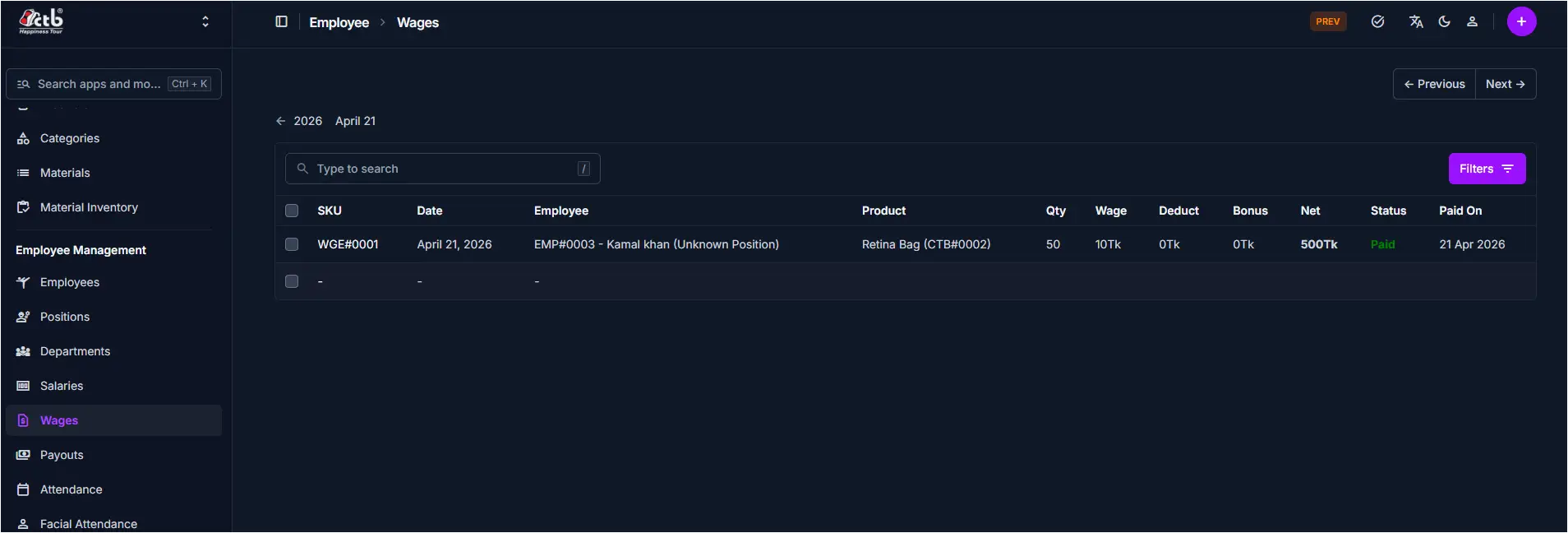
The main list displays each wage transaction for employees on a single page.
Key columns include:
- SKU — Wage reference code for the transaction
- Date — When the wage was recorded
- Employee — Employee name and code
- Product — Product or work associated with the wage
- Qty — Quantity of work completed
- Wage — Wage rate per unit
- Deduct — Any deductions applied
- Bonus — Any bonuses added
- Net — Net wage amount after deductions and bonuses
- Status — Payment status (e.g., Paid)
- Paid On — Date the wage was paid
Search and filters
- Use the search field to find wage records by SKU or employee name.
- Use the Filters button to narrow results by date, status, or other values.
Best practices
- Always verify the Net amount before confirming payment.
- Use filters to quickly find unpaid or pending wage records.
- Check the Product and Qty to ensure accurate wage calculation.
Related Pages
- Employees — Manage employee details and wage assignments
- Payouts — Review and process wage payments
- Salary — View monthly salary records and reports