Salaries Overview
The Salaries module is the main control point for managing all employee monthly salary records in CTB Admin. Use this page to view all salary records, search by employee or month, filter by status and date, and quickly access salary records for review, approval, payment, or analysis.
What you can do in this module
- Generate salary records — automatically calculate monthly compensation for all employees based on attendance, wages, and configured deductions.
- View salary status — track whether salaries are draft, generated, or paid.
- Review salary details — inspect the base salary, overtime, bonuses, deductions, and net amount for each employee.
- Record payments — mark salaries as paid when compensation is disbursed to employees.
- Search and filter — locate salaries by employee name, month, or payment status.
- Export payslips — generate PDF payslips for sharing with employees or payroll records.
How to access Salaries Overview page
From the sidebar, go to Employee → Salaries.
The system opens the Salaries List page where all salary records are displayed.
List Page Columns and Fields
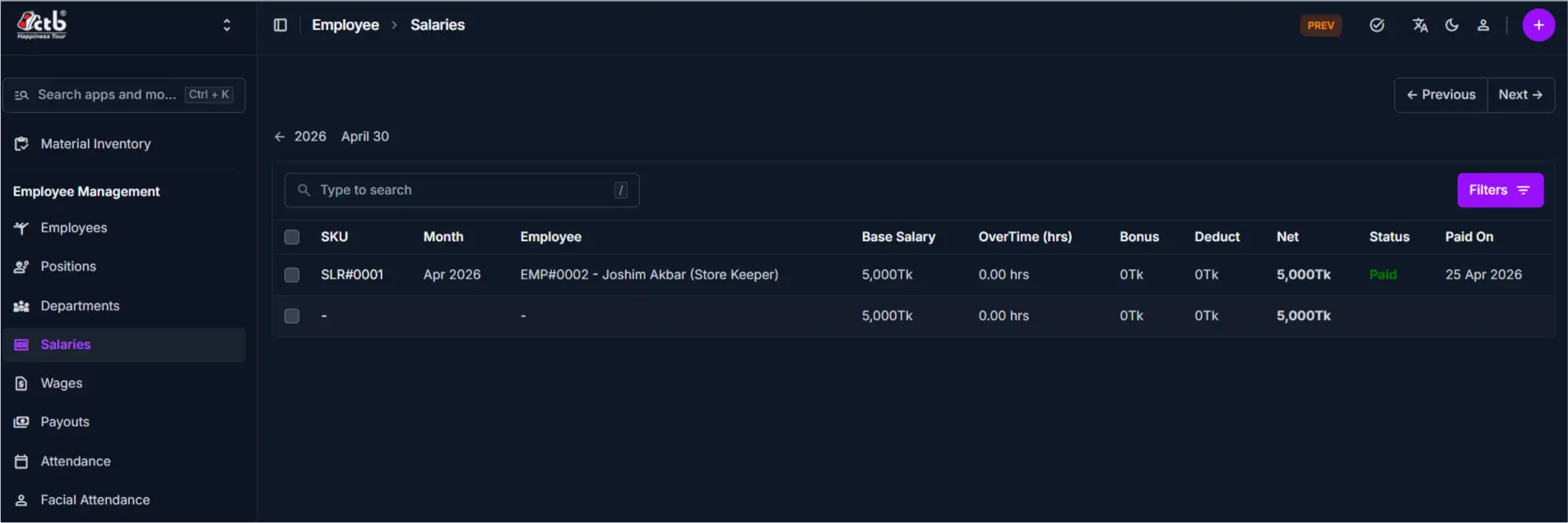
The Salaries list displays the following information for each salary record:
| Column | Description |
|---|---|
| SKU | System-generated unique identifier for this salary record (e.g., SLR#0001) |
| Month | The payroll period or month for which this salary is calculated (e.g., Apr 2026) |
| Employee | Name and position or employee ID of the staff member linked to this salary record |
| Base Salary | The employee's fixed monthly salary amount before overtime, bonuses, or deductions |
| OverTime (hrs) | Number of overtime hours worked in this month, if any |
| Bonus | Additional compensation or bonus added to the salary for this month |
| Deduct | Total deductions applied (tax, insurance, loans, penalties, or other reductions) |
| Net | The final amount due to the employee after all calculations (Base + OT + Bonus - Deduct) |
| Status | Salary status (Draft, Generated, Paid, or other applicable status) |
| Paid On | Date when payment was recorded and disbursed to the employee |
Search and Filter
Use the search and filter options to quickly locate specific salary records:
- Search box — Type to search by employee name, SKU, or reference
- Date navigation — Use the calendar arrows to navigate to a specific month or payroll period
- Filters — Click Filters to narrow results by status, date range, employee, or salary amount
- Status indicators — Visual status badges show whether a salary is draft, generated, or paid
List Actions
From the Salaries List page:
- Generate salary — Click the Generate Salary button to automatically create or update salary records for the selected month
- View details — Click on any row to open the full salary detail page
- Edit salary record — Open a salary record to modify components like bonus or deductions (only available for draft or generated salaries)
- Record payment — Mark a salary as paid from the salary detail page when compensation is disbursed
- Export payslip — Generate a PDF payslip from the salary detail page for employee records or payroll archive
- View calculation — Open any salary record to see the full breakdown of base salary, overtime, bonuses, and deductions
Tips
- Generate salary after attendance review — Confirm all attendance and wage entries are complete before generating salary to ensure accurate calculations.
- Month is the key filter — Use the date navigation to quickly jump to the payroll period you need.
- Status determines actions — Only draft or generated salaries can be edited; paid salaries are locked for audit purposes.
- Deductions may vary by employee — Check the detail page to see why one employee's deductions differ from another's.
- Net salary is what employees receive — The Net column shows the actual amount to disburse; always verify before payment.
- Overtime and bonus are optional — If zero, these fields simply do not add to the base salary.
- Paid On date is required for audit — Always record the payment date when marking a salary as paid.
Related Pages
- Generate Salary — Bulk create or update salary records for a specific month
- Salary Detail — View complete information and component breakdown for a single employee's salary
- Attendance Overview — Review employee attendance records that feed into salary calculations
- Wages — Manage hourly or per-task wage rates used in salary computation
- Payouts — Record and track bulk disbursements or manual payments to employees